CSS Anchor Positioning Is Baseline. You Can Probably Delete Floating UI
Tooltips and popovers that flip when they hit the viewport, in pure CSS. What anchor positioning replaces, and the cases it still cannot cover.
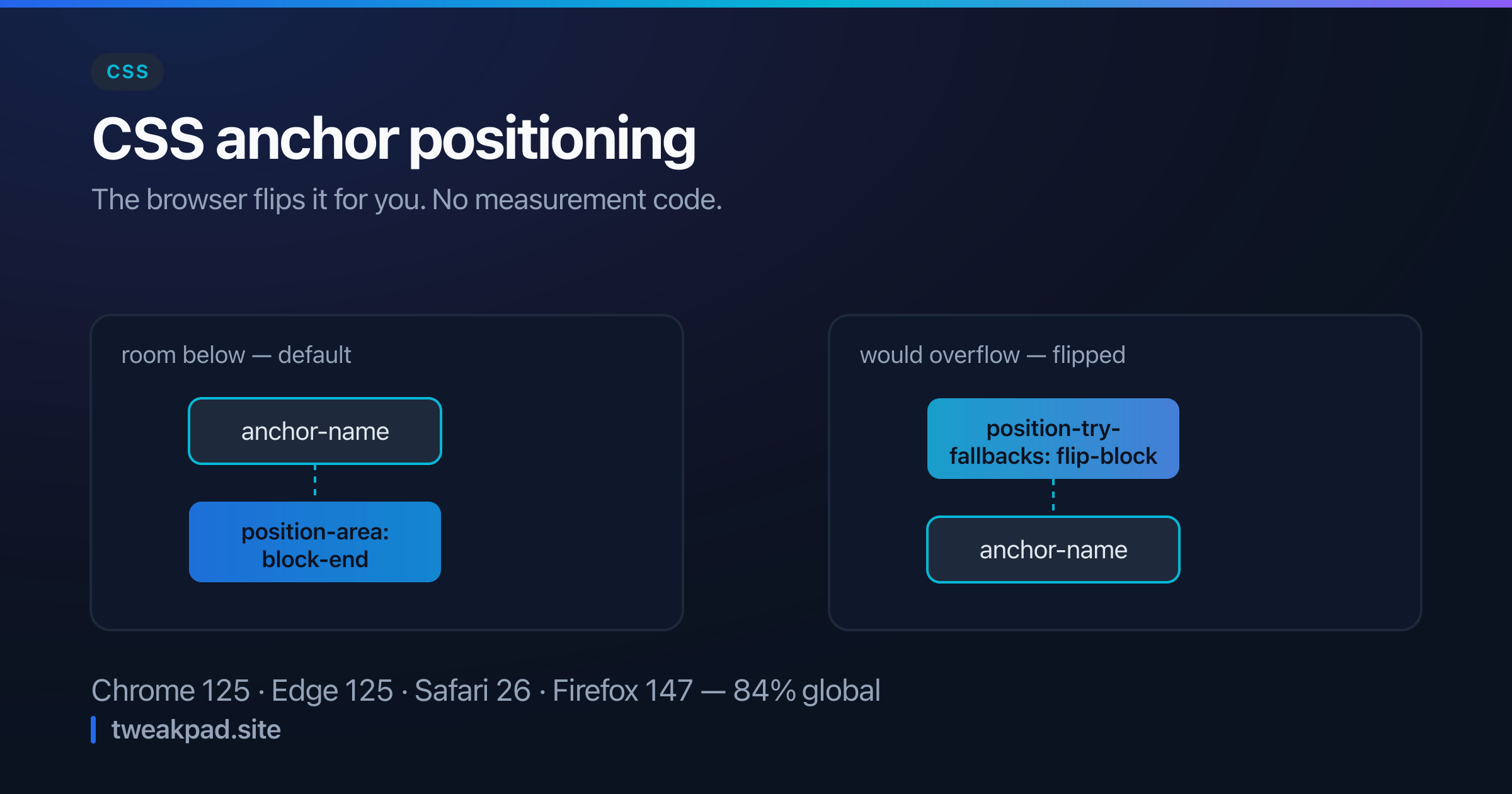
Table of contents
Every dropdown, tooltip and popover on the web solves the same problem: put this element next to that one, and move it if it would fall off the screen. Solving it in JavaScript means measuring both elements, listening for scroll and resize, and recomputing on every frame. That is what Floating UI and Popper before it existed to do, and it is why a tooltip costs 10 kB.
CSS can now do the whole job declaratively. Chrome and Edge support it from 125, Safari from 26, and Firefox from 147. That is all four engines, at 84% global support.
Key takeaways#
anchor-namemarks the anchor;position-anchorandposition-areaplace the element against it.- Fallback positions are declarative:
position-try-fallbacksflips the element when it would overflow. - The browser handles scroll and resize. No measurement code. No reflow loop.
- It composes with the
popoverattribute and the top layer, which is what removes the z-index fight. - It cannot detect collisions with arbitrary elements. Only the containing block and the viewport.
How does it work?#
Three declarations. Name the anchor, reference it, and say where to sit.
.trigger {
  anchor-name: --menu-trigger;
}

.menu {
  position: absolute;
  position-anchor: --menu-trigger;
  position-area: block-end span-inline-end;
}
position-area divides the space around the anchor into a three-by-three grid and lets you name a cell. block-end span-inline-end means below the anchor, extending toward the inline end. These are logical keywords, not physical ones. That means the layout mirrors correctly in a right-to-left language without a second stylesheet.
Two details make this easier than it looks. The anchor name is a dashed ident, like a custom property, so it cannot collide with a class or an id. And the positioned element still needs position: absolute or fixed — anchor positioning decides where an out-of-flow element sits, not whether it is out of flow.
When you need precision rather than a grid cell, anchor() returns a specific edge:
.menu {
  top: anchor(bottom);
  left: anchor(left);
  width: anchor-size(width);
}
anchor-size() is the quiet convenience — matching a dropdown's width to its trigger is a line of CSS rather than a resize observer.
What about flipping near the viewport edge?#
This is the part that justified the JavaScript, and it is now declarative:
.menu {
  position-area: block-end;
  position-try-fallbacks: flip-block, flip-inline;
}
The browser tries the declared position first. If the element would overflow, it works through the fallbacks in order. flip-block tries the opposite side vertically. flip-inline does the same horizontally.
For anything more specific, define your own:
@position-try --shift-up {
  position-area: block-start;
  margin-block-end: 0.5rem;
}

.menu {
  position-try-fallbacks: --shift-up;
}
The browser re-evaluates this on scroll and resize, at the layout level. That is less code than a JavaScript listener, and smoother, because nothing recalculates after the fact.
Where it beats a library, and where it does not#
Use CSS for: tooltips, dropdown menus, select popovers, context menus, hover cards, form field hints. That is the overwhelming majority of what a positioning library gets used for.
Keep JavaScript for: collisions with arbitrary elements rather than the containing block. Virtual anchors that are a coordinate instead of an element, such as a context menu at the cursor. And anchors living in a different scroll container, where the behaviour is subtler than it first looks.
The last one deserves a warning. The two elements must share a containing block for the tether to behave. A transform, filter or contain on any ancestor creates a new one. So if a popover suddenly attaches to the wrong place, look for an ancestor with transform: translateZ(0). That is nearly always the cause.
What does this save in practice?#
A dropdown built on Floating UI needs the library, a positioning hook, refs on both elements, and an effect that starts and stops the auto-update loop. Roughly forty lines of component code before any markup, plus the dependency.
The CSS version is six declarations and no JavaScript at all. The saving is not only the bytes. It is the whole category of bugs that comes from positioning being recomputed in a effect: the flash of a menu at the wrong coordinates before the first measurement lands, the stale position after a parent resizes without firing a listener, the loop that keeps running because a cleanup was missed.
There is a performance difference too, and it favours CSS by more than the bundle size suggests. A JavaScript positioner measures in one frame and applies in the next, so a fast scroll shows the popover lagging its anchor. The browser resolves anchor positioning during layout, in the same pass that moves the anchor, so the two can never disagree.
Combining with popover#
Anchor positioning pairs with the popover attribute, and together they remove the two hardest parts of the problem:
<button popovertarget="menu" class="trigger">Options</button>
<div id="menu" popover class="menu">…</div>
.menu {
position-anchor: --menu-trigger;
position-area: block-end;
position-try-fallbacks: flip-block;
margin: 0.25rem 0 0;
}popover puts the element in the top layer. It renders above everything, whatever the z-index or overflow: hidden on an ancestor. That was the second reason people reached for a library. Light-dismiss and focus management come free with it.
Note that popovers in the top layer need position-anchor explicitly, since they are no longer near their trigger in the layout tree.
What about the 16%?#
It fails gracefully if you let it. An older browser ignores position-anchor and position-area completely. The element then falls back to whatever your position and offsets say.
Give it a sensible static position first, then enhance:
.menu {
  position: absolute;
  top: 100%;
  left: 0;
}

@supports (anchor-name: --a) {
  .menu {
    position-anchor: --menu-trigger;
    position-area: block-end;
    position-try-fallbacks: flip-block;
  }
}
Older browsers get a menu below the trigger that does not flip near the edge. That is degraded, not broken. For most interfaces it beats shipping 10 kB on every page.
If you are cleaning up a stylesheet after removing a positioning library, the CSS formatter makes the leftover absolute-positioning rules easy to spot.
The short version#
The job a library did — measure, place, flip, follow on scroll — is now four CSS properties, running at layout level. At 84% support, with graceful degradation behind an @supports guard, most projects can drop the dependency today. Keep it only for virtual anchors and arbitrary-element collision. And watch for ancestors that create a containing block.
Sources: MDN: CSS anchor positioning, Can I use: CSS anchor positioning
Tags
- CSS
- Anchor Positioning
- Baseline
- Ui