View Transitions Went Cross-Browser. Here Is What That Costs You
Firefox 144 completed the set at 90% support. How the snapshot model works, why one CSS rule animates a whole page, and the traps.
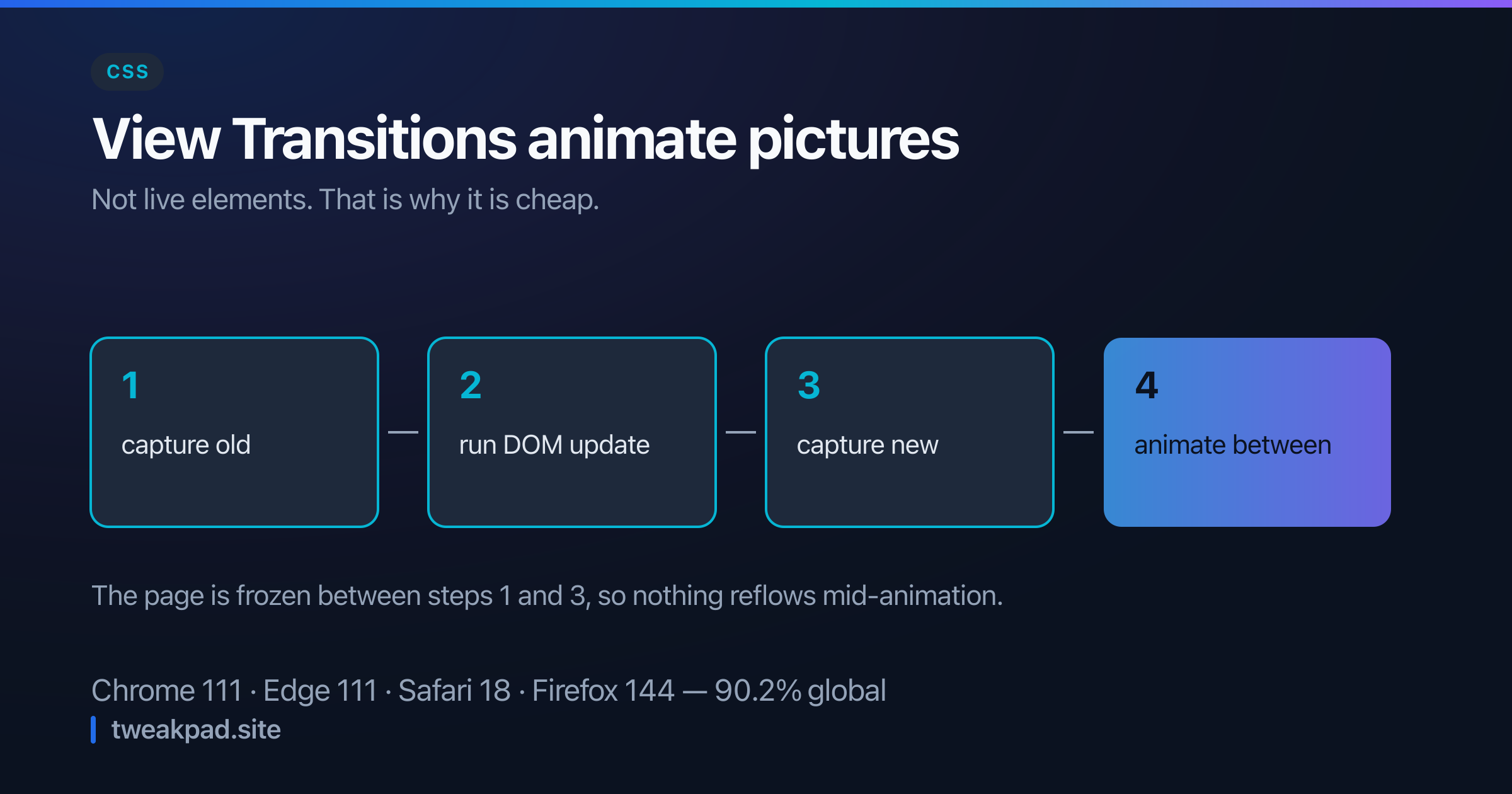
Table of contents
Animating between two states of a page has always meant keeping both alive at once. You render the old list and the new list, position them over each other, animate, then remove one. Every framework has a library for it and every one of those libraries is a workaround for the same missing primitive.
The View Transitions API supplies the primitive. Firefox shipped it in 144, which puts it in all four engines at 90.2% global support.
Key takeaways#
- The browser screenshots the old state, applies your DOM change, screenshots the new one, and cross-fades between them.
- Your update code is unchanged. You wrap it in
document.startViewTransition(). view-transition-nameopts an element out of the crossfade so it morphs between positions instead.- Names must be unique per snapshot. Two elements with the same name abort the transition.
- It respects
prefers-reduced-motiononly if you write the media query yourself.
How does the snapshot model work?#
Four steps, and understanding them explains every quirk that follows.
The browser captures the current rendering as an image. It calls your callback, which mutates the DOM however you like. It captures the new rendering. Then it animates between the two images using a pseudo-element tree.
document.startViewTransition(() => {
  list.replaceChildren(...newItems);
});
That is a complete transition. The default is a cross-fade of the whole page, and it works because the browser is animating pictures rather than live elements.
The pictures are the key insight. Between the two captures the page is frozen, so nothing reflows mid-animation and nothing needs both states in the DOM at once. It also means the animation is compositor-driven and cheap.
Making one element morph instead of fade#
Give it a name and it gets its own snapshot pair, animated independently:
.hero-image {
  view-transition-name: hero;
}
Now the hero animates from its old geometry to its new one while the rest of the page cross-fades. No measurement, no FLIP maths, no library. The browser knows both rectangles because it captured both.
Customise it through the generated pseudo-elements:
::view-transition-old(hero),
::view-transition-new(hero) {
  animation-duration: 300ms;
  animation-timing-function: cubic-bezier(0.2, 0, 0, 1);
}
The full tree is ::view-transition at the root, then ::view-transition-group, ::view-transition-image-pair, and the old/new pair underneath. You rarely need more than the last two.
The uniqueness rule that will bite you#
A view-transition-name must be unique across the document at capture time. Two elements sharing one aborts the whole transition, silently, with a console warning you will not be watching for.
This is easy to violate without noticing. Put view-transition-name: card in a component's stylesheet, render a list of ten cards, and every transition on that page stops working.
The fix is to generate names per instance:
<article style={{ viewTransitionName: `card-${id}` }}>The related trap is the transition between two pages where the same logical element exists in both. That is exactly what you want to morph, so the name has to match across the change while still being unique within each snapshot. Names identify the same thing before and after, not this element.
What it replaces#
The libraries that did this job all implement some version of FLIP: read the first position, apply the change, read the last position, invert the difference with a transform, then play it back. It works, and it has three costs the browser version does not.
The first is the forced reflow. FLIP has to measure the new layout synchronously before painting, which blocks the main thread at exactly the moment the user is waiting.
The second is that both states must exist simultaneously. Animating a list reorder means rendering the old list and the new list together, which doubles the DOM for the duration and makes the whole thing awkward when items are expensive to render.
The third is state. A library needs refs on every animating element, cleanup on unmount, and cancellation when a second update arrives mid-animation. The snapshot model has none of that, because the browser is animating images that no longer depend on the DOM.
Cross-document transitions#
Same-document transitions cover a single-page app. Multi-page sites get the cross-document form, which needs no JavaScript at all:
@view-transition {
  navigation: auto;
}
Both documents must opt in, and they must be same-origin. Add matching view-transition-name values on either side and a header or hero morphs across a real navigation.
This is the more interesting half for a content site, because it delivers app-like continuity without adopting a client-side router. Support is narrower than the same-document API, so treat it as enhancement.
Accessibility is not automatic#
Nothing here respects motion preferences on your behalf. A full-page slide is exactly the kind of movement that triggers discomfort, so gate it:
@media (prefers-reduced-motion: reduce) {
  ::view-transition-group(*),
  ::view-transition-old(*),
  ::view-transition-new(*) {
    animation: none !important;
  }
}
Two more things worth knowing. During a transition the page is inert, so a long duration is a period where clicks do nothing — keep it under about 300ms. And because the animation runs on snapshots, a screen reader sees the new DOM immediately while the visual is still moving, which is the right behaviour but means the animation should never carry information.
Should I adopt it now?#
For same-document transitions in an app, yes. It degrades perfectly: in a browser without support, startViewTransition is undefined and the DOM update simply happens instantly.
if (document.startViewTransition) {
  document.startViewTransition(update);
} else {
  update();
}
That is the entire fallback. No visual regression, no polyfill, no bundle cost. A transition library, by contrast, is 10 to 30 kB doing a worse version of the same job.
For cross-document, treat it as progressive enhancement on a same-origin site and check support before relying on it for anything structural.
The short version#
The browser now does the hard part: capture, freeze, animate two images. One function call gets a cross-fade, one CSS property makes an element morph, and the fallback is that nothing animates. Watch the uniqueness rule on names, keep durations short because the page is inert, and write the reduced-motion query yourself.
Sources: MDN: View Transition API, Can I use: View Transitions
Tags
- CSS
- View Transitions
- Animation
- Performance