llms.txt vs robots.txt: Only One of Them Blocks AI Crawlers
llms.txt shows no measurable effect on AI citations, and Content-Signal is ignored by every crawler. Only robots.txt is honoured.
Table of contents
- Key takeaways
- llms.txt vs robots.txt: what is the actual difference?
- What does an llms.txt file actually look like?
- Does llms.txt stop AI companies training on my content?
- Which AI crawlers should I actually block?
- Why is there a Content-Signal line in my robots.txt?
- Does blocking Google-Extended remove me from AI Overviews?
- Which layer actually enforces anything?
- What a defensible robots.txt looks like
- How do I check what crawlers actually see?
- What blocking everything actually costs
- The short version
- Frequently asked questions
- Do I need an llms.txt file?
- Will blocking GPTBot remove my content from ChatGPT?
- Should I remove the Content-Signal line Cloudflare added?
- Does robots.txt keep a page out of Google's index?
- How long until a robots.txt change takes effect?
- Related reading
- References
Three files claim authority over what AI systems may do with your content: robots.txt, llms.txt, and ai.txt. One of them is honoured by every major AI company. The other two are conventions that nobody agreed to enforce.
Worse, a directive you never added is probably sitting in your robots.txt right now, doing nothing. Your CDN put it there.
Key takeaways#
robots.txtis the only one of the three with published support from OpenAI, Anthropic, Google, Meta, Common Crawl, Perplexity and Apple.- Google supports exactly four fields:
user-agent,allow,disallow,sitemap. Every other line is ignored. - SE Ranking's November 2025 study of nearly 300,000 domains found no correlation between
llms.txtand AI citation frequency. - Cloudflare's
Content-Signal:line was auto-added to millions of managedrobots.txtfiles. Google's John Mueller says it has "no effects whatsoever for any crawler or LLM". - Blocking
Google-Extendeddoes not remove you from AI Overviews. Different system, different control.
llms.txt vs robots.txt: what is the actual difference?#
robots.txt controls access: which user agents may fetch which paths. llms.txt does the opposite job. It points a model at your best, cleanest pages, in Markdown, for use at inference time. One is a fence, the other a signpost. Neither can do the other's work.
Both files sit at the domain root and both mention AI, which is how the distinction gets lost. A site can ship a careful llms.txt and stay fully open to every training crawler on the internet, which is the opposite of what its author intended.
ai.txt is a third proposal, from the Spawning project, aimed at opting media out of training datasets. It has the same problem as llms.txt. No major AI operator publishes a commitment to read it.
What does an llms.txt file actually look like?#
Markdown, not a directive list, which is the fastest way to see why it cannot block anything. The specification requires exactly one thing: an H1 with the site name. Everything after it is optional — a blockquote summary, some prose, then H2 sections holding curated links.
# TweakPad

> Free developer tools that run entirely in the browser: formatters,
> encoders, validators and generators, with no upload step.

## Tools

- [JSON Formatter](https://tweakpad.site/tools/json-formatter): pretty-print and validate JSON
- [JWT Decoder](https://tweakpad.site/tools/jwt-decoder): inspect a token's header and claims

## Articles

- [Base64 Is Not Encryption](https://tweakpad.site/blog/base64-is-not-encryption)
Every line is a recommendation. There is no Disallow, no user-agent scoping, and no field that could express refusal. Jeremy Howard published the format on 3 September 2024, and the specification does not address access control at all.
Version 2 landed on 10 August 2026, and the additions are worth knowing because they are about discovery rather than permission:
- Markdown discovery. A link relation and an HTTP header let an HTML page announce that a Markdown equivalent exists.
- A second URL pattern.
/docs/tutorial.htmlmay now advertise/docs/tutorial.html.mdor/docs/tutorial.md. ## Optionallost its mechanical meaning. In v1 tools were told to skip that section. In v2 it is a naming convention and nothing more.
Nothing in v2 moves the file closer to being a control surface. It got better at the job it always had.
Does llms.txt stop AI companies training on my content?#
No. llms.txt contains no access directives, and no major AI operator has published a commitment to honour it. It is a content-discovery convention, not a permission system.
A file that lists your best pages cannot also forbid their use. Nothing in the specification tries to.
Whether it helps at all is a separate question, and there is now data on it. SE Ranking analysed nearly 300,000 domains and published the results on 7 November 2025. Adoption had reached 10.13%, up from roughly 0.4% in April 2025. Then they tested whether it correlated with anything.
They ran Spearman correlation, XGBoost regression and SHAP analysis. None of the three found a relationship between having an llms.txt and how often a site gets cited. One detail makes the result hard to argue with: removing the llms.txt variable from their model improved its accuracy. The signal was not weak. It was noise.
Adoption was also almost flat across traffic tiers: 9.88% for the smallest sites, 10.54% in the middle, 8.27% for sites above 100,000 visits. If the file worked, the sites with the most to gain and the largest SEO budgets would not be the least likely to have one.
Which AI crawlers should I actually block?#
Block the training crawlers. Allow the retrieval crawlers. Training crawlers collect content for model weights and send nothing back. Retrieval crawlers fetch a page to answer a live question and cite you, which is a referral channel. Block both and you leave AI assistant surfaces entirely.
Every major operator publishes the distinction. It is easy to get wrong anyway, because the token names look almost identical.
| User agent | Operator | What it does | Block it? |
|---|---|---|---|
GPTBot | OpenAI | Crawls for foundation-model training | Yes, if opting out |
OAI-SearchBot | OpenAI | Indexes for ChatGPT search | No — this cites you |
ChatGPT-User | OpenAI | Fetches a page a user asked about | No |
ClaudeBot | Anthropic | Collects content for model training | Yes, if opting out |
Claude-SearchBot | Anthropic | Improves search result quality | No |
Claude-User | Anthropic | Fetches a page for a user's question | No |
Google-Extended | Gemini training and grounding | Yes, if opting out | |
CCBot | Common Crawl | Builds the corpus others train on | Yes, if opting out |
Bytespider | ByteDance | Crawls aggressively; compliance varies | At the WAF |
Blanket-disallowing everything with "AI" in the name usually blocks OAI-SearchBot and Claude-SearchBot. Those are the two agents that were going to send traffic.
Why is there a Content-Signal line in my robots.txt?#
Cloudflare added it. On 24 September 2025 it launched the Content Signals Policy and applied it automatically to the managed robots.txt files of millions of customer sites. The line declares three preferences as machine-readable policy: search, ai-input and ai-train.
It looks like this:
User-agent: *
Content-Signal: search=yes,ai-train=no,use=reference
Allow: /
Google's John Mueller said the directive has "no effects whatsoever for any crawler or LLM". He added that it "just adds bloat and future maintenance to your robots.txt file."
The specification agrees. Four fields are supported: user-agent, allow, disallow, sitemap. Other fields such as crawl-delay are not. Unrecognised lines get ignored, not rejected.
So the line is legally interesting and technically inert. Cloudflare framed it as an express reservation of rights under Article 4 of the EU Copyright Directive, so it may matter in a future dispute. It will not stop a single crawler today.
Does blocking Google-Extended remove me from AI Overviews?#
No, and this is the most expensive misunderstanding in the list. Google-Extended governs whether crawled content may train future Gemini models. AI Overviews and AI Mode are surfaces inside Google Search, served from the live Search index by Googlebot.
Two separate pages of Google's documentation cover this, and neither is ambiguous. Google-Extended, it says, lets publishers "manage whether content Google crawls from their sites may be used for training future generations of Gemini models". The same page adds that it "does not impact a site's inclusion in Google Search nor is it used as a ranking signal in Google Search."
Google's AI features page points somewhere else entirely. There, "robots.txt directives for Googlebot is the control for site owners to manage access". It names four levers that limit what shows up: nosnippet, data-nosnippet, max-snippet and noindex.
Read those together and the trade-off is stark. The only way to keep your content out of an AI Overview is to restrict the snippet, and nosnippet takes your ordinary search snippet with it. No setting keeps the blue link intact while removing the summary above it.
Which layer actually enforces anything?#
Only the network layer. robots.txt is a published preference that well-behaved crawlers choose to honour, and a crawler that ignores it faces no technical obstacle. Enforcement requires something that can refuse a connection: a WAF rule, a bot-management product, or rate limiting at the edge.
Three layers, three different kinds of power:
| Layer | Mechanism | Power it has | Fails when |
|---|---|---|---|
| Preference | robots.txt, llms.txt, meta robots | Asks; widely honoured | The crawler chooses to ignore it |
| Enforcement | WAF rules, bot management, rate limits | Refuses the request | The bot rotates IPs or spoofs UA |
| Recourse | Terms of service, copyright, licensing | Acts after the fact | Attribution cannot be proven |
So the crawlers most worth stopping are exactly the ones robots.txt cannot stop. A bot that respects your file was never the problem. Put the compliant operators in robots.txt, and put anything with a reputation for ignoring it behind a rule that returns a 403.
Spoofing matters here too. A User-agent string is self-reported, so anyone can claim to be Claude-User to bypass a block on ClaudeBot. The operators publish IP ranges for exactly this reason — Anthropic at claude.com/crawling/bots.json, and Google, OpenAI and Bing at equivalent endpoints. Verify by address before you trust a name.
What a defensible robots.txt looks like#
As of August 2026, one shape holds up. Refuse the training crawlers, welcome the retrieval crawlers, and handle the bad actors somewhere that can actually enforce.
User-agent: *
Allow: /
Disallow: /admin
Disallow: /cdn-cgi/

User-agent: GPTBot
Disallow: /

User-agent: ClaudeBot
Disallow: /

User-agent: CCBot
Disallow: /

User-agent: Google-Extended
Disallow: /

Sitemap: https://example.com/sitemap.xml
Five things to check once it is live:
- Fetch the file from the canonical host. If
example.comredirects towww.example.com, the two can serve different bytes. - Confirm the
Sitemap:line survived. A CDN-managed block that replaces rather than prepends will silently drop it. - Keep it under 500 KiB. Google ignores everything past that limit.
- Remember the 24-hour cache. Google generally caches
robots.txtfor up to a day, so a fix is not instant. - Never use
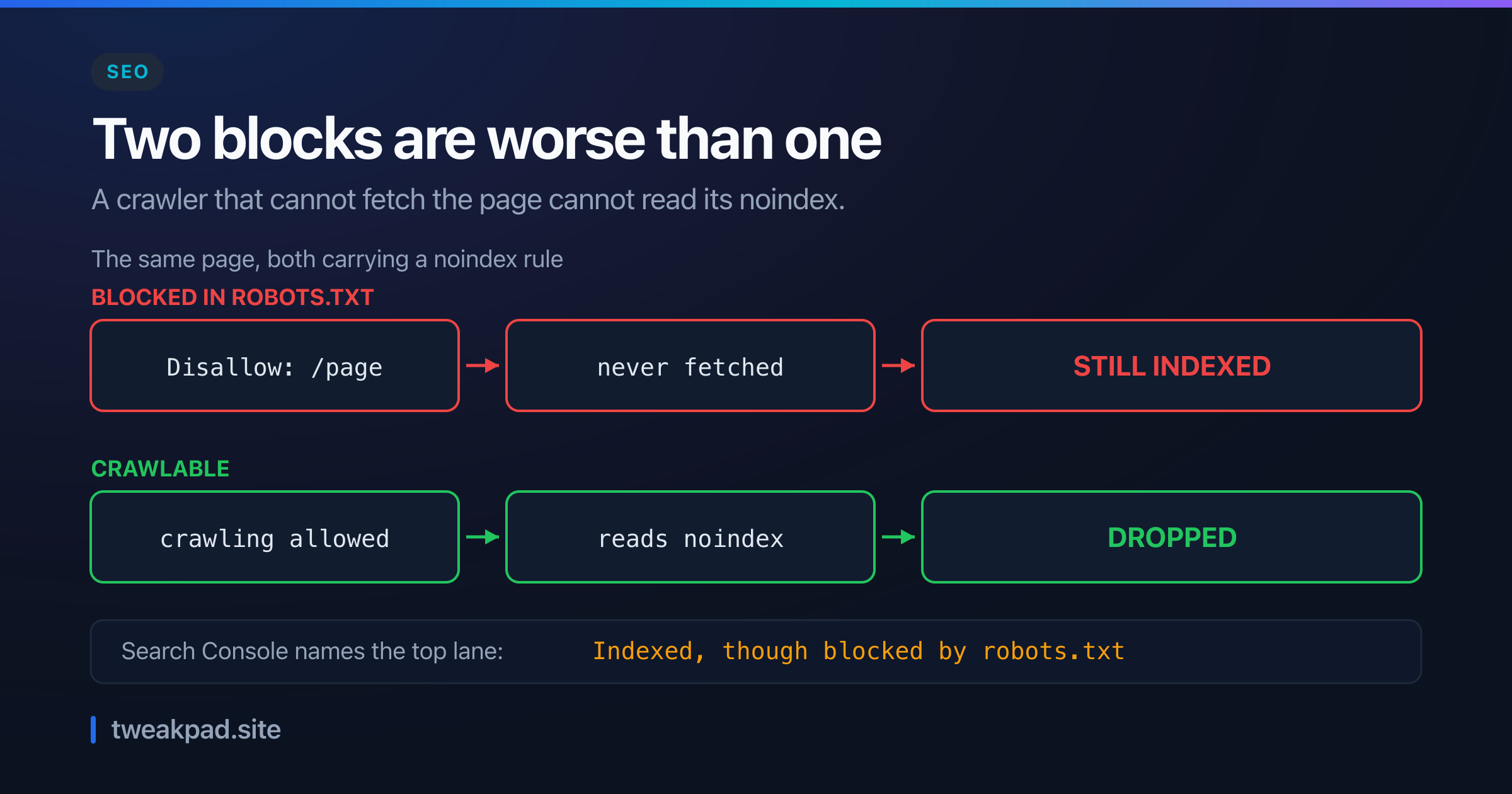
Disallowto hide a page from search. A blocked URL is never fetched, so itsnoindexis never read. It can still surface as a bare link.
For the file itself, the robots.txt generator lays the user-agent groups out correctly. For the snippet-level directives that robots.txt cannot express, use the meta tag generator, and the SEO analyzer to confirm what a crawler actually receives.
How do I check what crawlers actually see?#
Fetch the file the way a crawler does, from the canonical host, and compare it to what you committed. A managed CDN block, a host redirect and a cached copy can each make the served file differ from the one in your repository, and all three fail silently.
Four checks, in order of how often they catch something:
- Fetch from both hosts.
curl -sL https://example.com/robots.txtand again withwww.. A 308 to the canonical host means the apex may serve a different body — and it is the apex that some tools test. - Grep for the lines you wrote.
curl -sL https://example.com/robots.txt | grep -E "^Sitemap|Disallow". If yourSitemap:line is missing, a managed block replaced your file rather than prepending to it. - Read the Search Console robots.txt report. It shows the fetched file, the fetch time and any lines Google could not parse, which is the only view of what Google actually holds.
- Filter your access logs by user agent. The file says what you asked for. The logs say what arrived, and they are how you discover that
GPTBotstopped visiting three weeks ago while something unnamed kept crawling.
What blocking everything actually costs#
Opting out has a straightforward case behind it. Training crawlers consume your work and return nothing. If your product is the text, refusing them is often correct.
Against it: AI assistants are now a discovery channel, paid in the same currency as search traffic. Ask Claude or ChatGPT which tool formats a Power BI measure and the answer gets assembled from pages the retrieval crawlers could reach, loaded into the model's context window at request time rather than recalled from training. If yours was not reachable, someone else's was.
These are two separate decisions, and a single Disallow: / collapses them into one. Training and retrieval have different economics for you, and every major operator now publishes different tokens for them. Treating them as one policy throws away the half that pays.
The short version#
robots.txt is the only file in this argument that anything honours, and it supports four fields. llms.txt is a navigation aid with no measured effect on citations. Content-Signal is a legal marker, not a technical one. Google-Extended stops Gemini training and does nothing to AI Overviews.
Block the crawlers that take. Keep the ones that cite. Then go read the file your CDN is actually serving, because it is probably not the one you wrote.
Frequently asked questions#
Do I need an llms.txt file?#
Only if you want one as a documentation index. It has no measured effect on AI citations and no ability to restrict use, so it is a nice-to-have for agent-readable docs and nothing else. Sites with real API or product documentation get the most from it.
Will blocking GPTBot remove my content from ChatGPT?#
No. GPTBot collects training data. ChatGPT's search features use OAI-SearchBot, and a page a user asks about is fetched by ChatGPT-User. Blocking GPTBot alone leaves both retrieval paths open, which is usually what you want.
Should I remove the Content-Signal line Cloudflare added?#
It is inert either way. Google's John Mueller called it bloat, and no crawler acts on it. Cloudflare framed it as a reservation of rights, so there is a legal argument for keeping it. There is no technical argument for either choice.
Does robots.txt keep a page out of Google's index?#
No, and using it that way backfires. A disallowed URL is never fetched, so the noindex on it is never read, and the URL can still appear as a bare link discovered from elsewhere. Allow the crawl and use noindex on the page.
How long until a robots.txt change takes effect?#
Google generally caches robots.txt for up to 24 hours, and longer when a refresh fails. Other crawlers publish nothing about their cache duration. Treat any change as taking a day, and never rely on it to stop something urgent.
Related reading#
- LLM Context Windows Explained — what a retrieval crawler's fetch is actually used for
- Next.js Metadata API for SEO — generating
robots.tsand the page-level directives - Which Structured Data Still Earns a Rich Result — the other place effort goes for no return
- Core Web Vitals
- Build the file with the Robots.txt Generator, the head tags with the Meta Tag Generator, and check the result with the SEO Analyzer.
References#
Tags
- SEO
- AI
- Crawlers
- Robots Txt
- Llms Txt