Your noindex Stops Working the Moment You Block the Page
Adding noindex and a robots.txt block together is worse than either alone. Google never reads the rule on a page it cannot crawl.
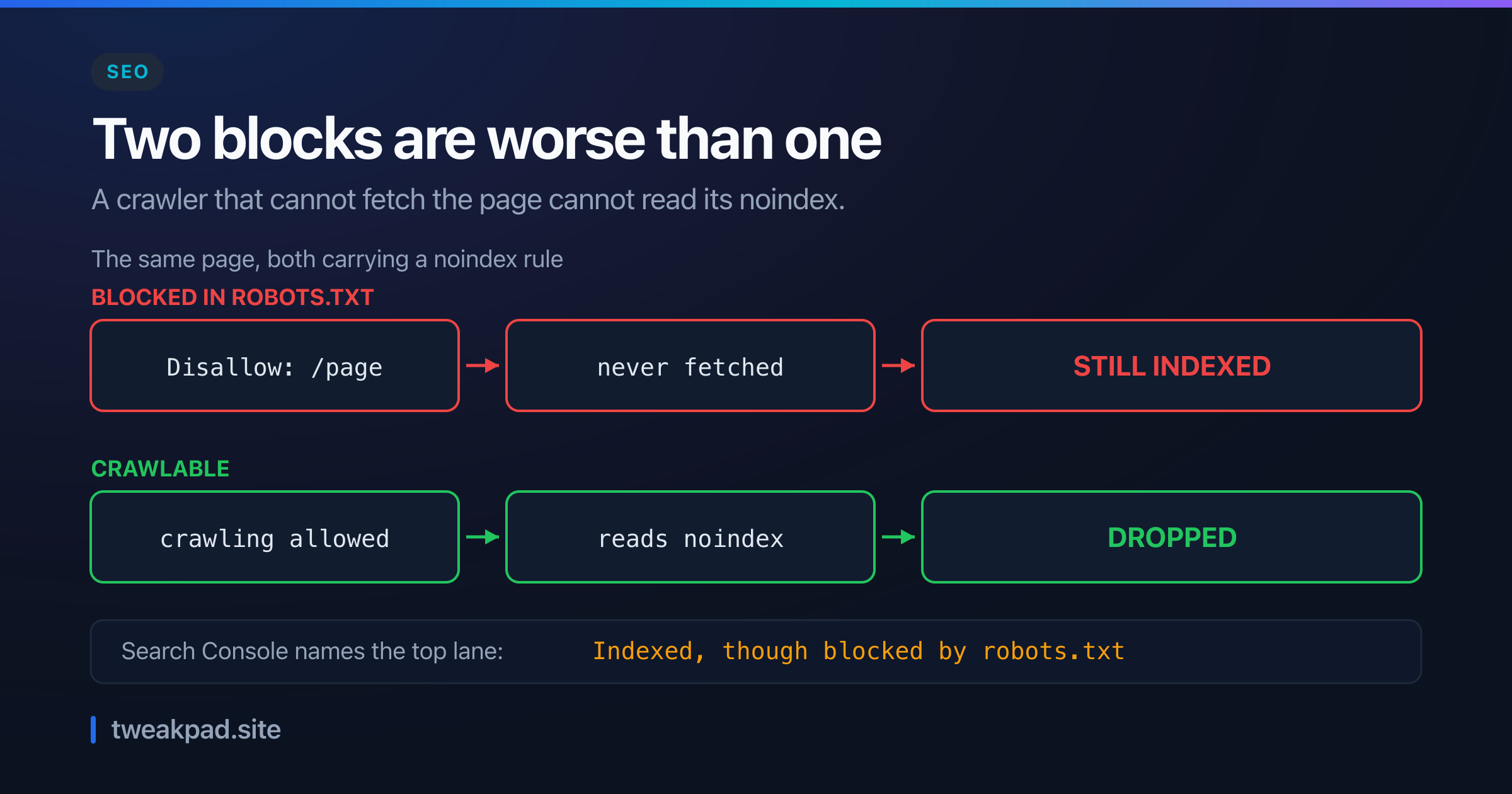
Table of contents
- Key takeaways
- What does noindex actually control?
- robots.txt is about crawling, not indexing
- Why the two cancel each other
- A worked example
- The status that names it
- Two ways to serve the rule
- A table for the decision
- The protocol says it is not a lock
- The failure mode, and how to detect it
- What robots.txt genuinely gets right
- Where this advice is wrong
- The short version
You want a page out of Google, so you do both things. You add a noindex rule, and you block the URL in robots.txt. Belt and braces.
That combination is worse than either measure on its own. Google says so in its own documentation, and the reason is simple once you see it.
Key takeaways#
- A blocked page is never fetched, so its noindex rule is never read.
- Google states plainly that robots.txt "is not a mechanism for keeping a web page out of Google".
- A disallowed URL can still be indexed when other sites link to it.
- Search Console has a name for this exact state, and it names the top lane of the problem.
- The fix is a sequence, not a combination: allow crawling first, block later if at all.
What does noindex actually control?#
It controls whether a crawled page may appear in results. Google fetches the page, reads the rule, and drops that URL from its index. So the rule lives inside the response, either as a meta tag in the HTML or as an HTTP header. Both require the crawler to receive the response before anything happens.
That dependency is the whole story. A rule inside a document only works if somebody reads the document.
robots.txt is about crawling, not indexing#
The confusion starts with what people assume robots.txt does. Google's introduction to the file corrects it in the first paragraph.
A robots.txt file tells search engine crawlers which URLs the crawler can access on your site. This is used mainly to avoid overloading your site with requests; it is not a mechanism for keeping a web page out of Google.
Read the last clause again. The file most people reach for to hide a page is documented as not doing that.
Google is equally direct about what can still happen to a blocked URL.
A page that's disallowed in robots.txt can still be indexed if linked to from other sites.
So blocking a URL removes your control over it. Google can learn the URL exists from an inbound link, and it has nothing from you saying to leave it out.
Why the two cancel each other#
Now put both measures on the same page, and read Google's warning on the noindex documentation.
For the noindex rule to be effective, the page or resource must not be blocked by a robots.txt file, and it has to be otherwise accessible to the crawler. If the page is blocked by a robots.txt file or the crawler can't access the page, the crawler will never see the noindex rule, and the page can still appear in search results, for example if other pages link to it.
That is the mechanism stated outright. The block is evaluated first, before any request happens, so the crawler stops at the door.
Your noindex is sitting inside a document nobody opened. It is not overridden or ignored, which would at least be visible. It is simply never delivered.
A worked example#
Take a shop with 50,000 faceted search URLs. They bloat the index, so the team wants them gone.
The instinct is to do both, in one deploy. Add Disallow: /search to robots.txt, and add a noindex meta tag to those pages.
Count what happens next. The already-indexed URLs stay indexed, because Google cannot fetch them to learn otherwise. New ones can join, if any page anywhere links to them. Zero URLs get removed by the rule the team just shipped.
Now do it in the right order. Allow crawling, keep the noindex, and wait for Google to recrawl all 50,000.
That wait is the real cost. Suppose Google crawls 5,000 of those URLs a day. Clearing the set takes roughly ten days, and only then can you add the robots.txt block to save crawl budget going forward. Sequence, then, rather than a single deploy.
The status that names it#
Search Console gives this failure its own label, which makes it unusually easy to confirm.
Look in the Page indexing report for "Indexed, though blocked by robots.txt". Google describes it as a page that "was indexed despite being blocked by your website's robots.txt file".
Compare that with the state you actually want. A page whose rule was read shows as "URL marked 'noindex'", described as: when Google tried to index the page it "encountered a 'noindex' directive and therefore did not index it".
Those two statuses are the whole diagnosis. One means your rule worked. The other means the crawler never reached it, so check that report before you trust anything in your own source code.
Two ways to serve the rule#
There are exactly two delivery mechanisms, and the second is the one people forget.
The HTML meta tag is the familiar one, placed in the head of the document:
<meta name="robots" content="noindex" />The HTTP response header does the same job and works on any response:
X-Robots-Tag: noindexThat header matters more than it looks. A PDF, an image or a generated CSV has no head element to put a meta tag in, so the header is your only option for a noindex on a non-HTML file. Our meta tag generator produces the HTML form, and your server or CDN config produces the other.
A table for the decision#
Pick the mechanism from the goal, because the two tools solve different problems.
| Your goal | Use | Why |
|---|---|---|
| Keep a page out of results | noindex, crawlable | Google must read the rule to obey it |
| Cut crawl load on junk URLs | robots.txt Disallow | Exactly what the file is for |
| Both, eventually | noindex first, block months later | The block prevents the removal |
| Genuinely private content | Password or auth | robots.txt is public and advisory |
| A PDF or other non-HTML file | X-Robots-Tag header | There is no head to hold a meta tag |
Row three is the one worth internalising. These are not two settings to combine, they are two stages, and the gap between them is however long a full recrawl takes.
Row four deserves a blunt note. Your robots.txt is a public file listing the paths you would rather people did not visit, which is a curious thing to publish if the content is sensitive. The next section is the standard saying so itself.
The protocol says it is not a lock#
Worth knowing what robots.txt is, formally. It became an IETF standard in 2022 as RFC 9309, written by Koster, Illyes, Zeller and Sassman.
The RFC describes a method "for service owners to control how content served by their services may be accessed, if at all, by automatic clients known as crawlers". Control, and crawlers. Neither word promises enforcement.
It then says the quiet part directly.
These rules are not a form of access authorization.
So a Disallow is a request. Well-behaved crawlers honour it, and the protocol has no mechanism to make anyone do so. A crawler that ignores your file is not breaking anything technical.
The RFC also warns about a side effect that catches people out.
The Robots Exclusion Protocol is not a substitute for valid content security measures. Listing paths in the robots.txt file exposes them publicly and thus makes the paths discoverable.
Read that as the reverse of what most people expect. Your robots.txt is fetchable by anyone, so every path you list becomes a published hint about where the interesting things live.
Adding Disallow: /admin-preview therefore tells the whole internet that /admin-preview exists. The file that was meant to hide it has advertised it instead.
That is why the answer for anything sensitive is authentication, and why the RFC calls for "a valid security measure relevant to the application layer". Use robots.txt to shape crawler load, and use a login to keep people out.
The failure mode, and how to detect it#
Nothing errors here, which is why it survives so long. Your deploy succeeds, the tag is present in the HTML, and a developer checking the page source sees the rule sitting right there.
So verify from the crawler's side instead. Fetch the page as Googlebot with the URL Inspection tool and read whether crawling is allowed. If the tool reports the URL as blocked, your rule was never delivered, whatever the source shows.
Then check the report, since it counts the damage. Filter Page indexing for "Indexed, though blocked by robots.txt" and treat any non-zero number there as a set of pages actively defying your intent.
One quick sanity check catches most of this before it ships. For any URL you are adding a noindex to, ask whether the same URL matches a Disallow line. A robots.txt generator makes the current rules easy to read, and the same care applies to how you write directives for AI crawlers, which we covered in llms.txt versus robots.txt.
What robots.txt genuinely gets right#
None of this makes robots.txt a bad file. It is excellent at the job it documents, and that job is real.
Crawl budget is a genuine constraint on large sites. A crawler spending its allowance on a million faceted permutations is not spending it on your product pages, and a Disallow fixes that immediately, with no recrawl required. It takes effect on the next request rather than after a full pass.
It also protects your servers. That is the use Google names first, avoiding "overloading your site with requests", and it works because the crawler checks the file before hitting your origin.
So the right mental model is a traffic control, not a privacy control. Use it to manage load and attention, and never to hide anything.
Where this advice is wrong#
Sometimes you want the block and accept the index entries. On a site with millions of junk URLs, crawl budget may matter more than a handful of URL-only listings with no snippet. Blocking without noindex is a defensible trade if you make it knowingly.
The recrawl wait can be shortened. My ten-day figure assumed passive recrawling. A sitemap listing those URLs, or the URL Removal tool for urgent cases, moves faster, and the removal tool is the right answer when something confidential is live right now.
Most sites never hit this. If you have a few hundred pages and no faceted navigation, the interaction is a curiosity rather than a risk. The trap needs scale, and it needs someone reaching for two safeguards at once, which is a reasonable instinct that happens to be wrong here.
The short version#
A noindex rule travels inside the page, so a crawler that cannot fetch the page cannot read it. Google documents both halves: robots.txt "is not a mechanism for keeping a web page out of Google", and a blocked page means "the crawler will never see the noindex rule". Combining them produces pages that stay indexed while you believe they are being removed, which Search Console reports as "Indexed, though blocked by robots.txt". So allow crawling, let the rule do its work, confirm the status flips to "URL marked 'noindex'", and only then consider a block for crawl budget.
Sources: Google Search Central: block indexing with noindex, Google Search Central: introduction to robots.txt, Google Search Console: Page Indexing report
Tags
- SEO
- Google Search
- Robots Txt
- Indexing