Iceberg Partition Evolution Changes the Future, Not the Past
Partition evolution in Iceberg rewrites nothing. Old data keeps the layout it was written with, and every later query plans both layouts.
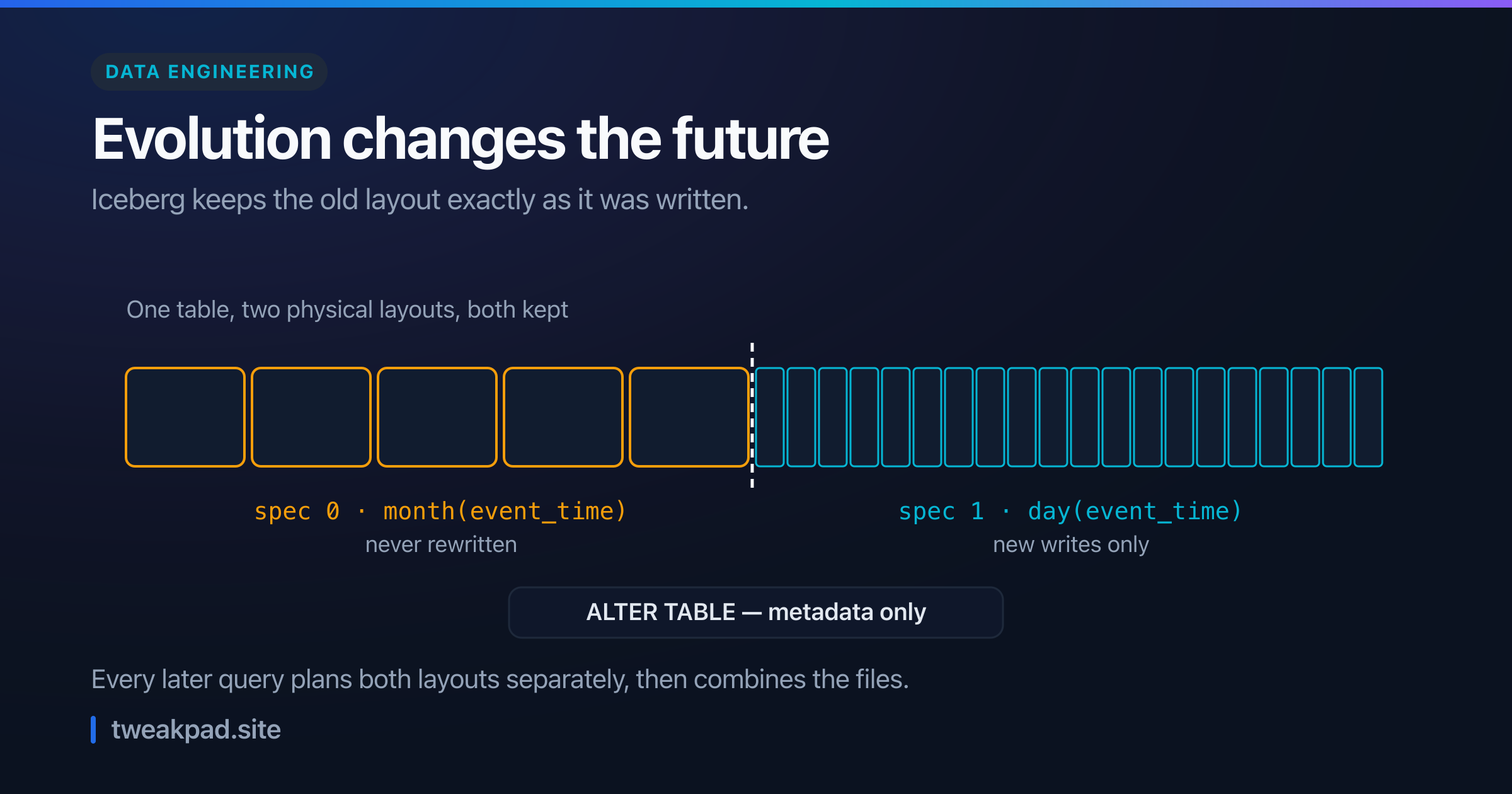
Table of contents
- Key takeaways
- What does partition evolution actually change?
- Hidden partitioning is the part that earns the praise
- The sentence people skip
- A worked example
- How a file remembers its layout
- Dropping a field is not quite a delete
- A table for the decision
- What a rewrite actually costs
- The failure mode, and how to detect it
- What explicit partitioning gets right
- Where this advice is wrong
- The short version
Partition evolution is the Iceberg feature people quote when they say you can change your mind for free. The docs agree that it is free, and the exact wording is where the catch lives: it "is a metadata operation and does not eagerly rewrite files".
Free means nothing moved. Your old data still sits in its original layout, and it stays there until somebody rewrites it on purpose.
Key takeaways#
- Evolving the spec changes new writes only, and never touches existing files.
- The table then holds two layouts at once, and queries plan each one separately.
- A manifest records the
partition_spec_idit was written with, which is how that works. - Whether old data still queries well depends on write order, not on the spec.
- Dropping a partition field with
voidis a v1-table technique, not a general one.
What does partition evolution actually change?#
It changes the spec used for future writes. Existing files keep their original partitioning, Iceberg keeps metadata for every spec version, and reads combine them. So the operation is instant and cheap, because it edits table metadata rather than data, and the physical layout of everything already written stays exactly as it was.
That is a genuinely good design. It is also narrower than "the table is now partitioned by day".
Hidden partitioning is the part that earns the praise#
Before criticising the edges, the core feature deserves its reputation, because the problem it removes was nasty.
In Hive, a partition column is real and the writer has to populate it. The docs are blunt about what goes wrong:
Using the wrong format,
2018-12-01instead of20181201, produces silently incorrect results, not query failures
Choosing the wrong source column or time zone fails the same silent way.
Iceberg instead records the relationship. You partition by day(event_time), and Iceberg derives the value. As the docs put it, "Producers and consumers wouldn't even see event_date."
That is what makes evolution possible at all. Queries never name the partition column, so changing it breaks nothing.
The sentence people skip#
Read the evolution docs closely and they state the trade plainly:
When you evolve a partition spec, the old data written with an earlier spec remains unchanged. New data is written using the new spec in a new layout.
Then comes the consequence:
Metadata for each of the partition versions is kept separately. Because of this, when you start writing queries, you get split planning.
Split planning means each layout derives its own filter and plans its own files, and the results merge. It works, and nobody has to know about it. Still, the planner keeps reading the old half under the old spec, because that is the only spec its files carry.
So partition evolution fixed your writes. It did not fix your table.
A worked example#
Take three years of events at 100 GB per month, so about 3.6 TB. You partitioned it by month(event_time), and today you switch to day(event_time).
Query one day inside the new range and Iceberg prunes to a single day partition, reading roughly 3.3 GB. Query one day inside the old range and partition pruning can only get you to a month, which is 100 GB.
Here is the part that decides whether that hurts. Iceberg also stores per-file lower_bounds and upper_bounds for columns, and each bound "must be less than or equal to all non-null, non-NaN values in the column for the file". So the planner can skip files whose range excludes your day.
Now make it concrete. At 256 MB per file, a 100 GB month holds about 400 files. If the writer emitted those files in event_time order, one day touches roughly 13 of them, or about 3.4 GB. If an engine shuffled them, every file spans the whole month, the planner can skip nothing, and the query reads all 400.
That is a 30× swing produced by write order, with an identical partition spec on both sides. The same effect governs row group skipping, which we covered in Parquet predicate pushdown.
How a file remembers its layout#
The mechanism is simple once you see it in the spec, and it explains why old data can never drift.
Each manifest carries field 502 partition_spec_id:
ID of a partition spec used to write the manifest; must be listed in table metadata
partition-specs
Table metadata keeps the full list of specs the table has ever used.
So a spec is not a property of the table at read time. It belongs to the files, and the writer fixed it at write time. Evolution appends a new spec and points future writes at it.
That design is why the operation is safe and instant. It is also why no amount of evolving improves a single existing byte.
Dropping a field is not quite a delete#
One detail worth getting right, because the usual advice omits its scope.
The void transform "always produces null". On dropping a field, the spec says:
The
voidtransform may be used to replace the transform in an existing partition field so that the field is effectively dropped in v1 tables.
Note the qualifier. That is a v1 technique. Repeat it as general Iceberg advice and people void a field on a v2 table where they could simply remove it. Check your format version before reaching for it.
A table for the decision#
Evolving is nearly free, so the real question is whether to also rewrite. These are the criteria I would use.
| Situation | Do | Why |
|---|---|---|
| Table is mostly future data | Evolve only | The old share shrinks on its own |
| Old range queried constantly | Evolve, then rewrite that range | Only a rewrite moves existing files |
| Old files already time-ordered | Evolve only | File stats recover most of the pruning |
| Old files written unsorted | Rewrite with a sort | Your problem is order, not the spec |
| Storage cost dominates | Evolve only | A rewrite holds both copies until snapshots expire |
Two of those five rows say the spec is not the interesting variable. That is the honest summary of this whole topic.
What a rewrite actually costs#
I have said "rewrite" several times without pricing it, and the details change the decision.
The Spark procedure is rewrite_data_files, and its default matters. The strategy argument takes "binpack or sort" and "Defaults to binpack strategy". Binpack combines small files into larger ones, which cuts file-open cost and metadata, and it does nothing about order.
So plain compaction will not fix the problem this article describes. You need strategy => 'sort' with a sort_order, which accepts an ordinary column list, or zorder(...), or hilbert(...) for multiple dimensions.
You can also scope the work with a where predicate, and here the docs add a warning that lands exactly on our theme:
Note that all files that may contain data matching the filter will be selected for rewriting
Read that against the worked example. If your old files each span a whole month, then a where clause naming one week still selects every file that might overlap it. The same missing order that made queries slow also makes the targeted repair expensive.
Budget the real costs too. A sort rewrite shuffles the range, so it needs compute proportional to the data. It also writes new files while the old ones stay reachable until you expire snapshots, so storage roughly doubles for that range in the meantime.
That is why partition evolution and rewriting are separate decisions rather than one migration. Evolution is instant and safe, and rewriting is a job you schedule, size and pay for.
The failure mode, and how to detect it#
The failure is quiet in the usual way. Nothing errors, queries return correct results, and a slice of them reads far more data than it should.
Correctness never wobbles after partition evolution, which is exactly why the cost hides. Split planning always produces the right answer, so only your bytes-scanned metric knows something changed.
Detect it by comparing equivalent queries across the boundary. Run a one-day filter against a date after the change, then the same shape of query against a date well before it, and compare bytes scanned rather than wall time. Wall time hides behind caching and cluster load; bytes scanned does not.
Then check the ratio. If the old-range query reads roughly a month where the new one reads a day, your old files lack useful order, and a rewrite fixes that. If it reads within a few multiples, file statistics are already doing the work and you can leave it alone.
Iceberg's metadata tables make this cheap to inspect, since you can query the manifests directly and see which spec each group of files carries. Reading a plan before trusting a runtime is the same habit that pays off in ordinary SQL query optimisation.
What explicit partitioning gets right#
Hive-style partitioning gets one thing right that hidden partitioning gives up, and it is worth naming.
Explicit partition columns are visible. A directory path tells you the layout, an engineer can see it in a listing, and there is no metadata layer between the query and the bytes. When something is slow, the reason is legible.
Iceberg's separation is better on balance, and it does cost you that legibility. The layout now lives in metadata, so understanding why a query was slow means reading manifests rather than a path. Teams new to it often assume the table follows its current spec everywhere. That holds only for rows the table has ingested since the last change.
Iceberg does hand that legibility back, through metadata tables you query with plain SQL. You name them by appending to the table name, so prod.db.table.partitions and prod.db.table.files both work.
Both carry a spec_id column, which answers our question directly: it tells you which spec each partition or file was written under. The files table also exposes lower_bounds, upper_bounds and sort_order_id, so you can check the ordering claim rather than guess it.
So the information is there. It moved from a directory listing into a query, and you have to know to ask.
That leaves a documentation problem more than a technical one. Record when specs changed, because a year later nobody remembers.
Where this advice is wrong#
Rewriting is not always worth it. Compaction reads and writes the whole range, costs compute, and holds two copies until old snapshots expire. For cold data queried monthly, paying that once to speed up a rare query is a bad trade.
Old data stops mattering by itself. Most event tables serve recent data first. If 90% of your queries touch the last 30 days, the badly-partitioned tail is nearly irrelevant, and partition evolution alone was the correct and complete fix.
I have implied you should sort everything. Sorting on write costs a shuffle, which slows ingestion, and one sort order cannot suit several query patterns at once. Sort by the column your filters actually use. If that is genuinely two columns, accept that one of them does worse.
The short version#
Partition evolution updates the spec for future writes and leaves every existing file exactly where it was, because it "is a metadata operation and does not eagerly rewrite files". Iceberg then plans each layout separately and merges the results, so answers stay correct while old data keeps its old pruning. Whether that hurts depends on how the writer ordered those old files, not on which spec they carry. So evolve freely, then measure bytes scanned either side of the boundary, and rewrite only the range that earns it.
Sources: Apache Iceberg table spec, Iceberg docs: evolution, Iceberg docs: partitioning
Tags
- Iceberg
- Data Engineering
- Lakehouse
- Query Performance