Your Airflow DAG May Not Have a Data Interval Any More
The standard fix for execution_date was to use the data interval. Airflow 3 allows runs without one, so those fields can be missing.
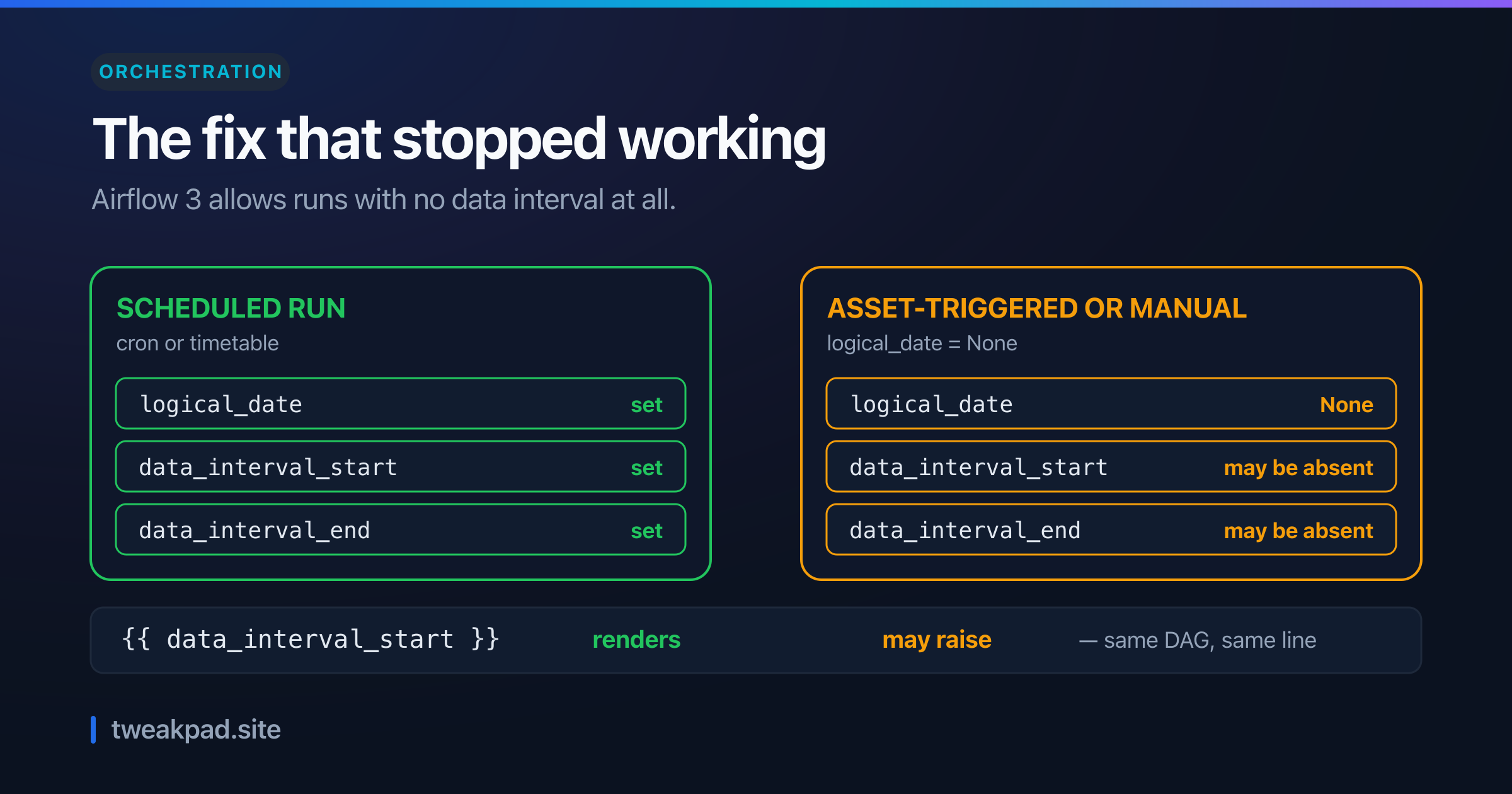
Table of contents
- Key takeaways
- What is a data interval, exactly?
- Why logical_date confused everyone
- A worked example
- What Airflow 3 changed
- The sentence that breaks the old advice
- A table for choosing a reference
- Writing a DAG that survives both
- Catchup is the same idea, scaled up
- The failure mode, and how to detect it
- What the interval model gets right
- Where this advice is wrong
- The short version
For years the fix for Airflow's most confusing variable was the same: stop using execution_date and use the data interval instead. That advice was correct, and Airflow 3 quietly broke it.
The release notes say that in some run types the interval fields "may not be present in the task context". So the recommended replacement can now be missing.
Key takeaways#
logical_datemarks the start of the window, not the moment the DAG ran.- A scheduled run fires after its window closes, so the two differ by a whole period.
- Airflow 3 removed the rule that every run maps to one interval, under AIP-83.
- Asset-triggered and manual runs can carry
logical_date=None. - On those runs
data_interval_startanddata_interval_endmay simply be absent.
What is a data interval, exactly?#
It is the window of time a run covers. The docs define it as "an assigned 'data interval' that represents the time range it operates in", and a scheduled run gets one derived from the schedule. The window is what your query should filter on, and it is not the same thing as the clock time your task started.
Two fields expose it, data_interval_start and data_interval_end. Both describe data, not execution.
Why logical_date confused everyone#
The classic gotcha comes straight from the definition. Airflow's docs state it plainly:
The "logical date" (also called
execution_datein Airflow versions prior to 2.2) of a Dag run, for example, denotes the start of the data interval, not when the Dag is actually executed.
So a run labelled Monday processes Monday's data and executes on Tuesday. The name execution_date promised the opposite, which is why Airflow renamed it in 2.2.
The scheduling rule behind that is deliberate:
A Dag run is usually scheduled after its associated data interval has ended, to ensure the run is able to collect all the data within the time period.
That is correct design. You cannot summarise Monday until Monday finishes.
A worked example#
Put clock times on it. Take a daily DAG with start_date of 2015-12-01 that the scheduler picks up on 2016-01-02 at 06:00.
The run it creates covers 2016-01-01 to 2016-01-02. Its logical_date is 2016-01-01 at 00:00, because that is where the window opens. The task itself starts at 06:00 on 2016-01-02.
Count the gap. Thirty hours separate the label from the execution, and nothing is wrong.
Now filter a query with {{ data_interval_start }} and you read 2016-01-01, which is right. Filter with today's wall clock and you read 2016-01-02, which is empty at 06:00 and wrong all day. That is the bug the rename was meant to prevent, and the same off-by-one thinking that makes cron day-of-week and day-of-month surprising.
What Airflow 3 changed#
The 3.0 release notes describe the change in one sentence, and it is broader than a rename.
Airflow 3.0 expands the types of DAGs that can be expressed by removing the constraint that each DAG run must correspond to a unique data interval.
That constraint had been load-bearing since the beginning. Every run had a window, so every run had logical_date, data_interval_start and data_interval_end.
The motivation is real work that never fitted the model. The notes list "model inference, hyperparameter tuning, and non-interval workflows" as the cases AIP-83 unlocks, and they are right that a hyperparameter sweep has no meaningful window. So runs may now carry logical_date=None.
The sentence that breaks the old advice#
Here is the consequence, stated in the upgrade notes:
In asset-triggered and manually triggered DAG runs with
logical_date=None, data interval fields such asdata_interval_startanddata_interval_endmay not be present in the task context.
Read that against a decade of migration guides. The instruction was always to replace execution_date with data_interval_start, and on these runs that field can be absent.
Meanwhile execution_date is gone rather than deprecated. The notes list it among context variables removed outright, alongside conf and dag_run.external_trigger, and the REST API dropped the parameter too.
So both names can fail on the same DAG. One is removed everywhere, and the other is conditional on run type.
A table for choosing a reference#
The right variable now depends on what you actually need, so here is how I would pick.
| What you need | Use | Why |
|---|---|---|
| The data window, scheduled DAG only | data_interval_start / _end | Correct and present on interval runs |
| The data window, any trigger type | An explicit param with a default | Interval fields may be absent |
| When the task really ran | A timestamp taken in the task | No context field means execution time |
| A unique handle for the run | run_id | Present on every run type |
| Backfill boundaries | The interval, behind a guard | Only interval runs have one |
The second row is the migration most teams have not done. Passing an explicit parameter costs a few lines and makes the DAG work under both models.
Notice that row three has no Airflow variable at all. If you want execution time, read the clock, because no context field has ever meant that.
Writing a DAG that survives both#
The pattern is small. Take the window from a parameter, and fall back to the interval only when one exists.
from airflow.sdk import DAG, Param

with DAG(
    "daily_rollup",
    schedule="@daily",
    params={"window_start": Param(None, type=["null", "string"])},
) as dag:

    def rollup(**context):
        # A param wins. The interval is a fallback, and may be absent.
        start = context["params"]["window_start"]
        if start is None:
            start = context.get("data_interval_start")
        if start is None:
            raise ValueError("no window: pass window_start for this run type")
        run_rollup(start)
Three things make that work. The parameter is explicit, so a manual or asset-triggered run can supply the window. The lookup uses context.get, so a missing key returns None rather than raising a KeyError.
Then the guard fails loudly. If neither source gives a window, the task stops with a message naming the fix, which beats processing an empty range and reporting success.
The docs point the same way for manual runs. They advise that if your logic needs the user-supplied date, "use logical_date explicitly instead of assuming it matches data_interval_start or data_interval_end".
Catchup is the same idea, scaled up#
Catchup shows why any of this matters, and the docs make the link directly.
Turn it on and the scheduler "will kick off a Dag Run for any scheduled run time that has not been run since the last run". Each of those runs gets its own window, which is the only reason a hundred simultaneous runs produce a hundred correct outputs instead of a hundred copies of today.
The docs state the condition plainly. If a DAG "is not written to handle its catchup (i.e., not limited to the interval, but instead to Now for instance.), then you will want to turn catchup off".
Read that as the general rule. A DAG bound to its interval is safe to replay, and one bound to Now is not. Correctness comes from the window, so a run without one cannot offer the same promise.
One detail worth updating if you learned Airflow years ago. The default is now off, since "missed scheduled run times between start_date and 'now' are not backfilled when a Dag is activated", with scheduler.catchup_by_default=False. Older tutorials warn about a flood of runs on activation, and that warning is out of date. Timestamp handling still repays care here, for the reasons in seconds versus milliseconds.
The failure mode, and how to detect it#
The failure depends on how you reference the field, and one form is much worse than the other.
Python code using context["data_interval_start"] raises a KeyError, which is loud and lands in your logs. Jinja templates are the dangerous path, since an undefined variable can render as an empty string rather than stopping the task.
Picture what that does to WHERE day >= '{{ data_interval_start }}'. The predicate becomes a comparison against an empty string, the query runs, and it returns whatever that comparison happens to mean in your engine. Nothing failed, and the numbers are wrong.
So set render_template_as_native_obj deliberately and configure Jinja to be strict about undefined names. A template that raises is far better than one that quietly renders nothing.
To find the exposure before it finds you, grep your repository for data_interval, logical_date and execution_date. Then cross-reference against which DAGs can be asset-triggered or manually run. Any overlap is a candidate.
The confirming test is two steps and takes a minute. Trigger the DAG on a schedule in staging and note the rendered template, then trigger the same DAG by hand and compare.
Read the rendered value rather than the task result. A task can succeed on both runs while the second one filtered on nothing, so a green tick proves less than the string does. Airflow shows it under the rendered-template view for each task instance.
Make that comparison part of review for any DAG you expose to manual triggering. It costs a minute and it is the only check that exercises the path your schedule never takes.
What the interval model gets right#
None of this makes intervals a mistake. They solved a genuine problem, and the solution still holds wherever it applies.
A data interval makes backfills coherent. Because a run is defined by the window it covers rather than the moment it started, rerunning last March produces the same output as the original run did. Idempotency comes from the model rather than from author discipline.
That property is why the label sits at the start of the window. A run means "the data for this period", so re-executing it later cannot drift.
Partition-by-day storage layouts assume the same thing, which is why the window survives into the files you write, as we saw with Iceberg partitioning.
Non-interval runs give that up, and honestly so. A hyperparameter sweep is not idempotent over a window, because there is no window. So the two models now coexist, and your DAG has to declare which one it lives in.
Where this advice is wrong#
Most DAGs are unaffected. If your DAG runs on a cron schedule and nobody triggers it by hand, every run has an interval and the old advice still works perfectly. The exposure comes from asset triggers and manual runs, not from upgrading.
Strict Jinja has a cost. Turning undefined names into errors will surface templates that have been quietly rendering blanks for years, and some of those are harmless. Expect noise before you get safety, and roll it out per DAG rather than globally.
Explicit params are not free either. Adding a parameter with a default moves the correctness question into your code, where a wrong default is just as silent as a missing field. The parameter helps because you can validate it, so validate it rather than trusting it.
And the interval model may outlast the exception. AIP-83 widened what a DAG can express, and most pipelines still process windows of time. So treat non-interval runs as a second case to handle, not as the new default, and keep the interval path as the one you optimise for.
The short version#
A data interval is the window a run covers, and logical_date marks its start rather than the execution time. Airflow 3 removed the rule that every run has one, so asset-triggered and manual runs can arrive with logical_date=None and no interval fields in context. The old migration advice, replacing execution_date with data_interval_start, is therefore only half a fix. Pass an explicit parameter for DAGs that can be triggered either way, make Jinja strict so a missing value raises instead of rendering blank, and read the clock when you genuinely want execution time.
Sources: Airflow docs: DAG runs and data intervals, Airflow 3.0 release notes, Airflow docs: timetables
Tags
- Airflow
- Data Engineering
- Orchestration
- Scheduling